Guillaume Louyot · Onickz Artworks
Editing · Directing · Post-production · VFX · Paris
Tool
StillKit 2.0
Extract the right still.
StillKit is a Windows tool designed to extract still images from video with precision and control. Version 2.0 is rebuilt around FFmpeg 9 for faster, more resilient processing across NVIDIA, Intel and AMD hardware, while keeping the focused workflow editors and filmmakers need.
Interface
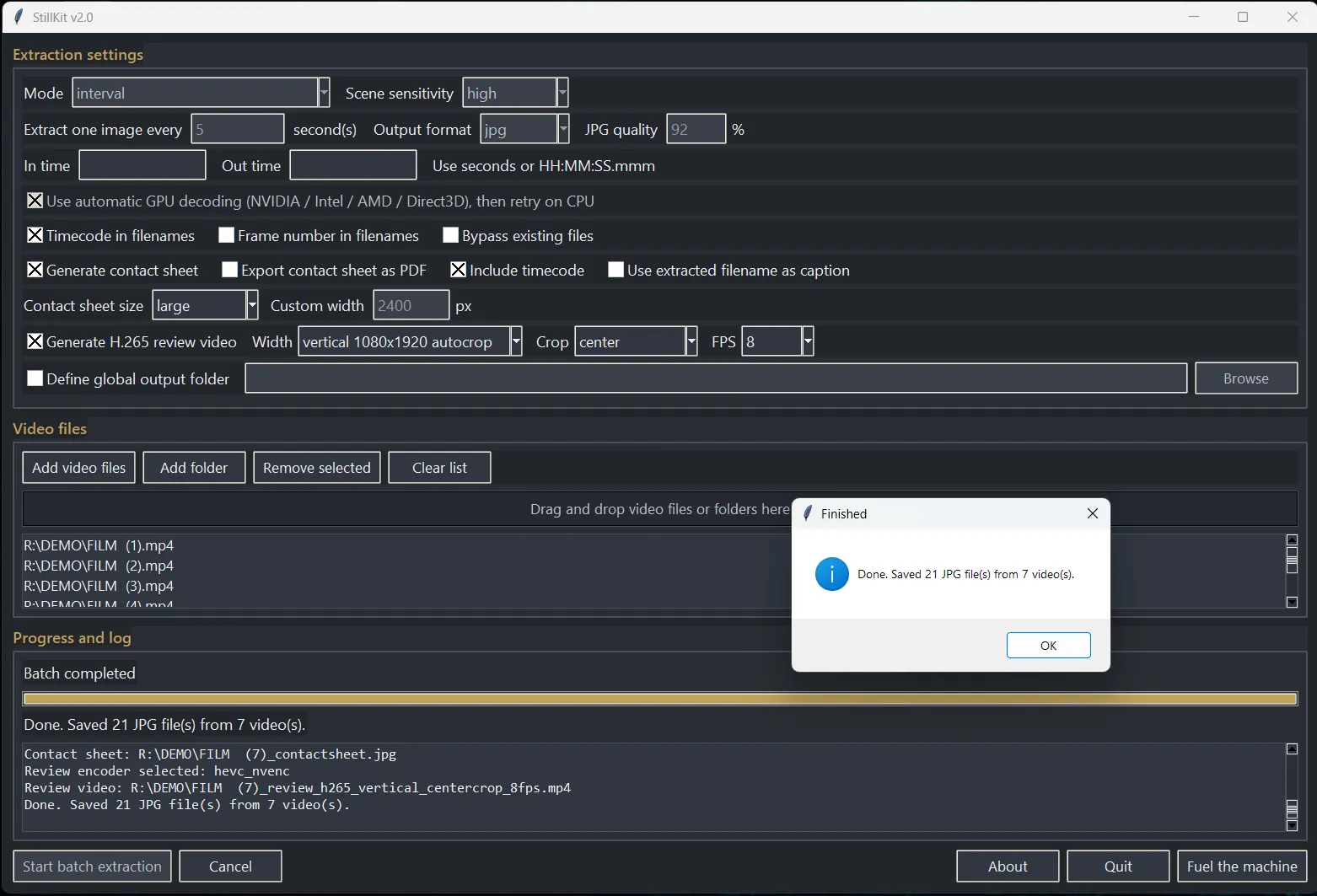
A focused interface designed for fast extraction, contact sheets, review exports and batch processing, without unnecessary clutter.
What it does
StillKit extracts still images from video with support for In and Out ranges, interval extraction, every-frame analysis with duplicate reduction, and multiple output formats including JPG, PNG, DPX and EXR.
It can generate contact sheets, create H.265 review videos, isolate the first image of a shot through scene detection, and organize outputs into structured folders for efficient workflows across single clips or entire projects. Version 2.0 also accepts animated WebP sources.
New in 2.0
Built for FFmpeg 9.0 “Lei”
Automatic NVIDIA, Intel, AMD and Direct3D hardware decoding
Automatic CPU decode retry when hardware decoding fails
NVENC, Quick Sync and AMF H.265 review encoding
Automatic libx265 fallback for review exports
Animated WebP input support
Faster source analysis with a single metadata probe
Reduced processing and interface overhead
Install
Extract the ZIP archive, keep StillKit_v2.0_FFMPEG9.exe, ffmpeg9.exe and ffprobe9.exe in the same folder, then launch StillKit. Version 2.0 requires FFmpeg 9.0 or newer.
Features
JPG, PNG, DPX and EXR output
Adjustable JPG quality in percent
In and Out range extraction
Timecode naming
Frame number naming with padded digits
Optional combined timecode and frame number filenames
Interval extraction or every frame with duplicate reduction
Scene detection with sensitivity control
Optional face detection assist
Bypass existing files for faster reruns
Optional global output folder
Automatic per-video extracted image folders
Contact sheet generation with optional PDF export
Timecode or extracted filename captions in contact sheets
H.265 review video export with width and FPS presets
Vertical 9:16 1080 × 1920 auto-crop export
Bundled FFmpeg 9 and FFprobe 9 processing
Automatic NVIDIA, Intel and AMD GPU acceleration
Automatic CPU fallback when GPU processing fails
Batch-friendly workflow with file and folder import
Why it exists
Extracting stills from video is often slower and more fragmented than it should be. StillKit was built to make this process direct, reliable and usable in real production workflows.
It focuses on a single purpose: turning footage into usable stills, contact sheets and review outputs with speed, consistency and minimal friction.
Use cases
StillKit is used whenever a frame needs to be isolated, analyzed or shared outside the timeline. It supports editorial review, frame comparison, scene overview, visual referencing, contact sheet generation and the preparation of review materials across both individual shots and full sequences.
Disclaimer
StillKit is provided “as is”, without warranty of any kind. The author assumes no responsibility for any use, misuse, or consequences arising from the use of this software.
Users remain solely responsible for how extracted images are created, used, shared or distributed.