Technical archive / Post-production
Cleaner XL.
An encoding-era archive.
A record of video compression and delivery workflows from the Discreet / Autodesk Cleaner XL era.
Encoding before today’s delivery formats.
Cleaner XL was presented here as a Windows tool for preparing and encoding video and audio. The original notes covered job queues, reusable processing presets, video filters and audio processing.
Windows Media 9, QuickTime 6, RealSystem 9, MPEG-2 and Kinoma for handheld devices were among the formats listed at the time. These are historical capabilities, not recommendations for present-day delivery.
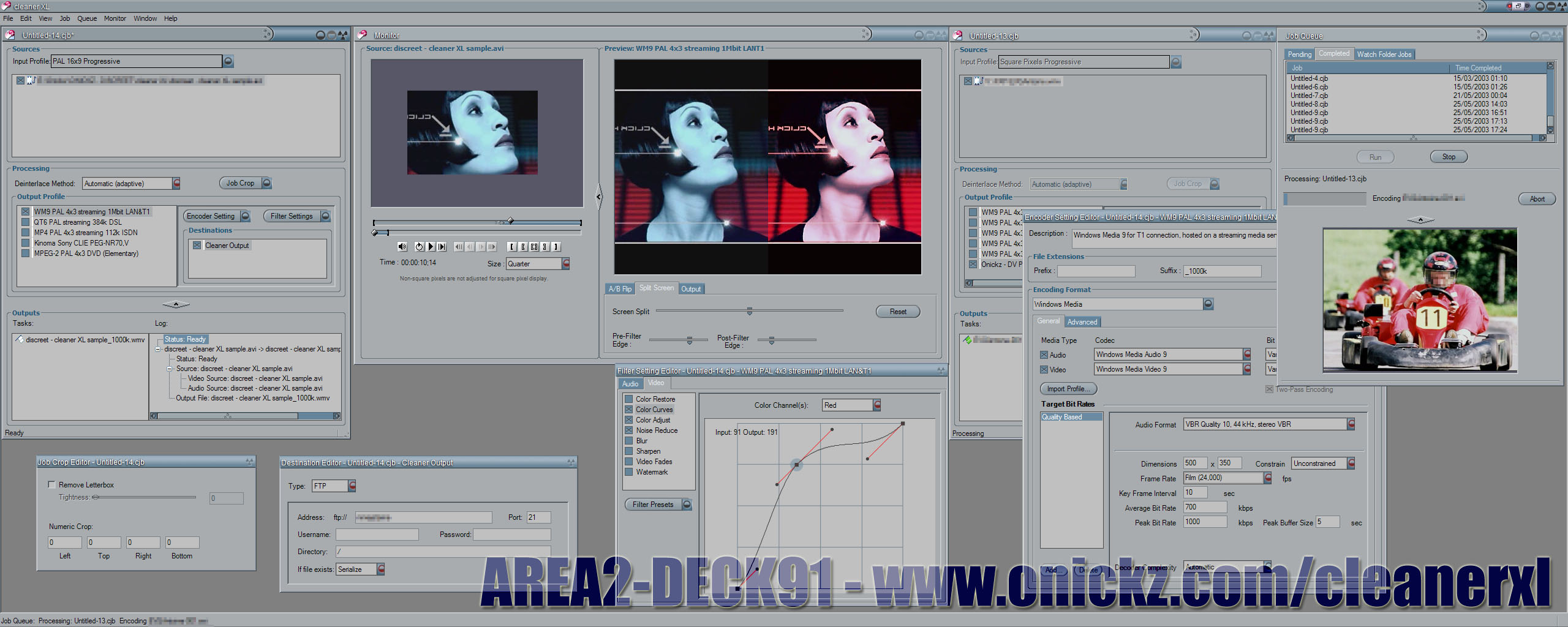
Workflow notes / From the original archive
Preparing an edit for encoding.
The old workflow notes described exporting a QuickTime reference movie from compatible editing systems, including Avid Xpress DV. Rather than containing all the video, this small file pointed to the original media. Cleaner XL still needed access to those sources and their codecs.
For editors without reference export, the page mentioned frameserving through PluginPac Frameserver: passing frames from the editing application to the encoder without first creating a complete intermediate movie. This is a record of a legacy workflow, not a current plug-in recommendation.
What to check before the final encode.
- Start with the source. Check the input profile, frame size, frame rate and field order before choosing the output settings.
- Balance size and quality. The original notes suggested two-pass variable-bitrate encoding where available. Judge the result on a representative section of the footage.
- Choose keyframes for the delivery format. The archive mentioned roughly one keyframe every five seconds for streaming. That was a historical example, not a universal setting.
- Review the audio. Check levels and clipping before export. The old checklist mentioned normalisation; this should not be treated as a substitute for the delivery requirements.
- Check filters in context. Contrast, saturation, noise reduction and audio processing can change the result. Compare a short encoded sample with the source before processing the whole programme.
The original page also offered a custom MPEG-1 preset for 320 × 240 at 25 fps. The externally hosted preset is not included here; the specification is retained as a marker of the delivery formats used at the time.